






Reduce LLM costs by up to 50%
Edgee’s token compression runs at the edge before every request reaches LLM providers, automatically reducing prompt size by up to 50% while preserving semantic meaning and output quality. This is particularly effective for:- RAG pipelines with large document contexts
- Long conversation histories in multi-turn agents
- Verbose system instructions and formatting
- Document analysis and summarization tasks
How It Works
Token compression happens automatically on every request through a four-step process:Semantic Analysis
Analyze the prompt structure to identify redundant context, verbose formatting, and compressible sections without losing critical information.
Context Optimization
Compress repeated context (common in RAG), condense verbose formatting, and remove unnecessary whitespace while maintaining semantic relationships.
Instruction Preservation
Preserve critical instructions, few-shot examples, and task-specific requirements. System prompts and user intent remain intact.
Compression is most effective for prompts with repeated context (RAG), long system instructions, or verbose multi-turn histories. Simple queries may see minimal compression.
Understanding compression ratio
The compression ratio (sometimes called compression rate in APIs) is compressed size ÷ original size: how large the compressed prompt is relative to the original.- 0.9 (Light) = compressed prompt is 90% of the original length → ~10% fewer tokens
- 0.7 (Strong) = compressed prompt is 70% of the original → ~30% fewer tokens (more aggressive)
Semantic preservation and BERT score
To avoid changing the meaning of the prompt, we compare the compressed text to the original using BERT score (F1). It measures how semantically similar the two texts are on a scale of 0–1 (0%–100%).- Semantic preservation threshold (0–100%) is the minimum similarity we require. If the BERT score is below this threshold, we do not use the compressed prompt—we send the original instead, so quality is preserved.
- In the console you choose Off (no check), Ultra Safe (0.95), Safe (0.85), or Edgy (0.75). Off = we always use the compressed prompt when compression runs; higher values = we only use the compressed prompt when it is very similar to the original; otherwise we fall back to the original.
Enabling Token Compression
Token compression can be enabled in three ways, giving you flexibility to control compression at the request, API key, or organization level:1. Per Request (SDK)
Enable compression for specific requests using the SDK:- TypeScript
- Python
- Go
- Rust
2. Per API Key (Console)
Enable compression for specific API keys in your organization settings. This is useful when you want different compression settings for different applications or environments.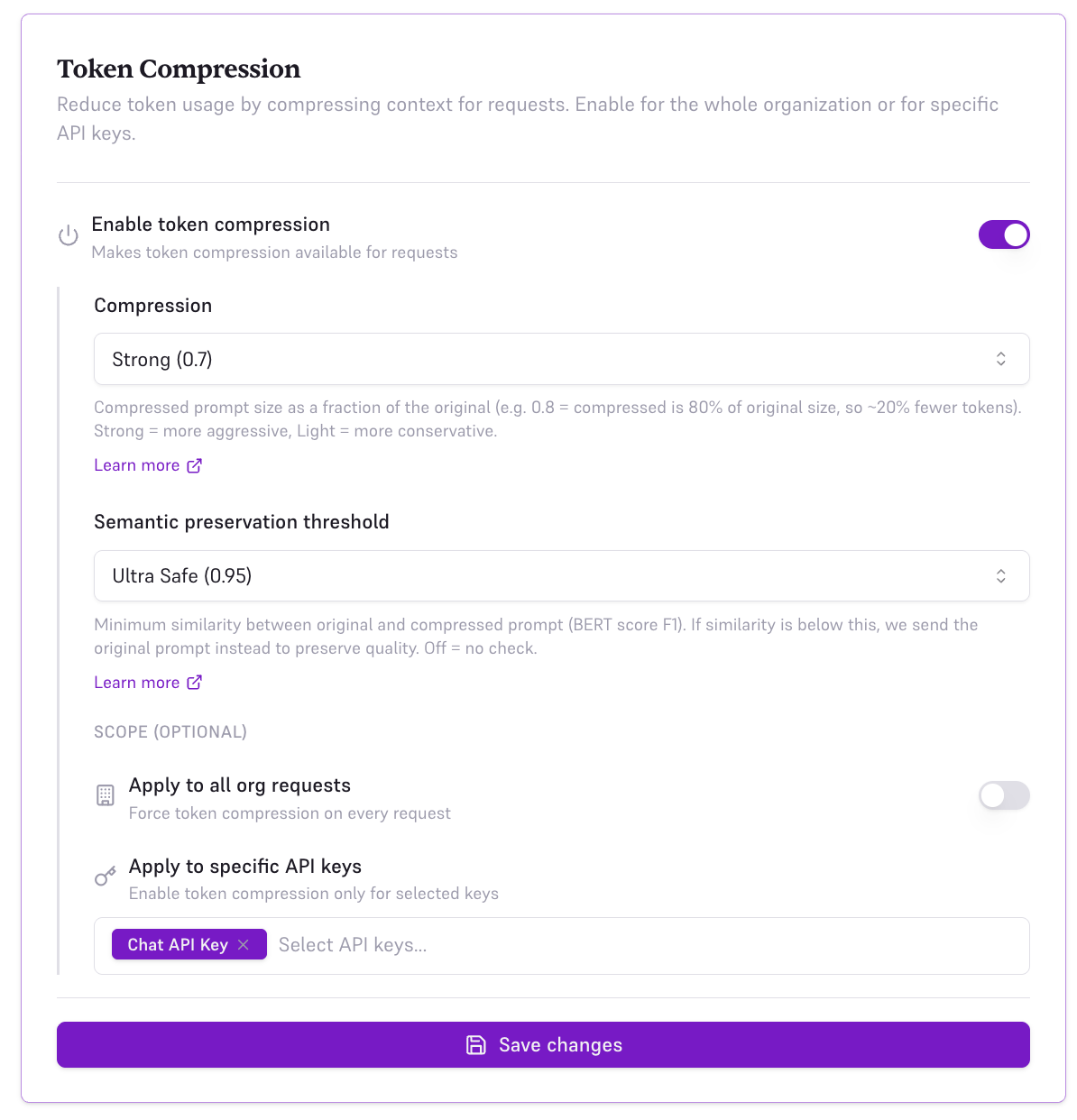
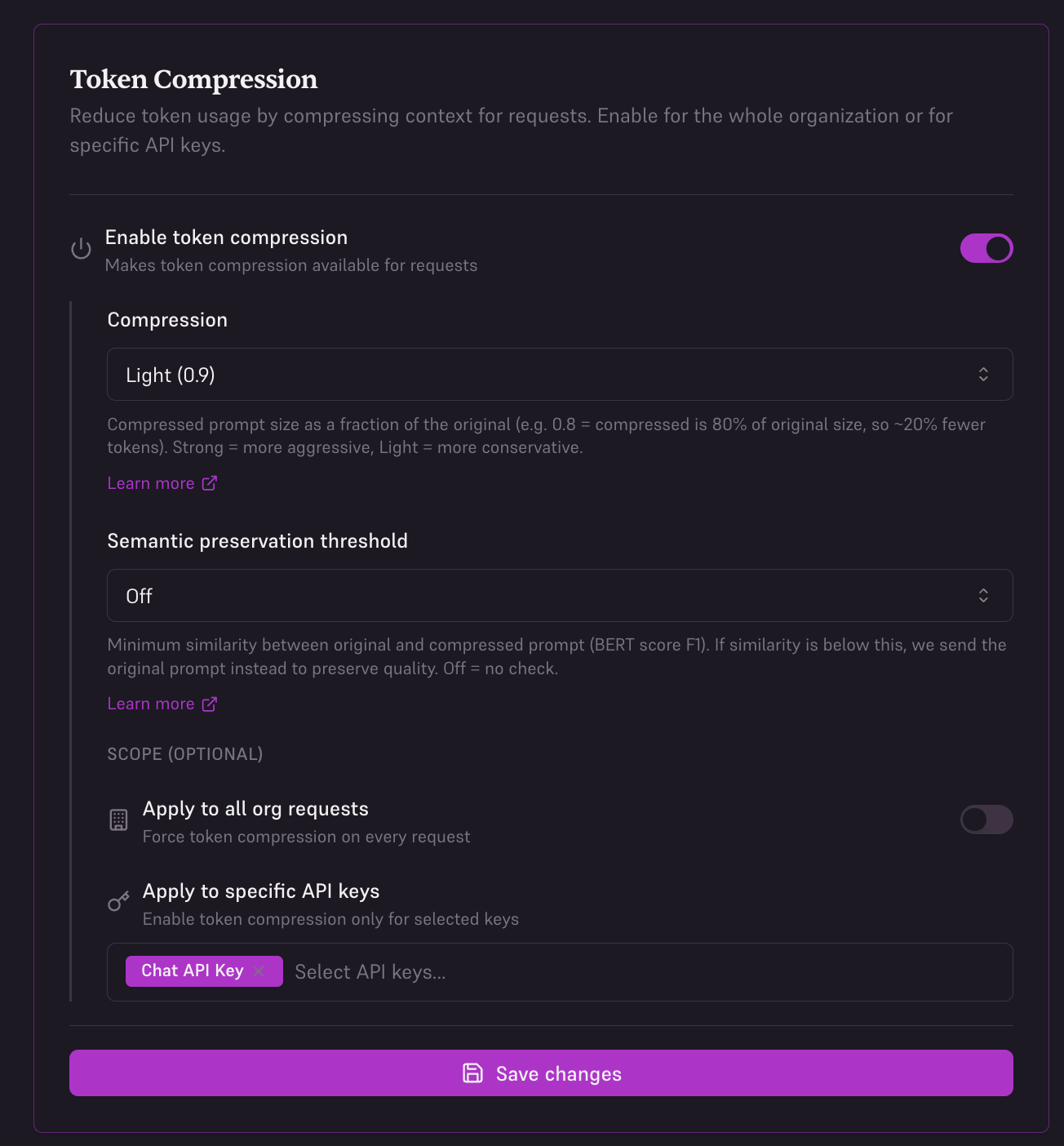
- Toggle Enable token compression on
- Set Compression to Light (0.9), Medium (0.8), or Strong (0.7) — see Understanding compression ratio
- Set Semantic preservation threshold to Off, Ultra Safe (0.95), Safe (0.85), or Edgy (0.75) — see Semantic preservation and BERT score
- Under Scope, select Apply to specific API keys
- Choose which API keys should use compression
3. Organization-Wide (Console)
Enable compression for all requests across your entire organization. This is the recommended setting for most users to maximize savings automatically.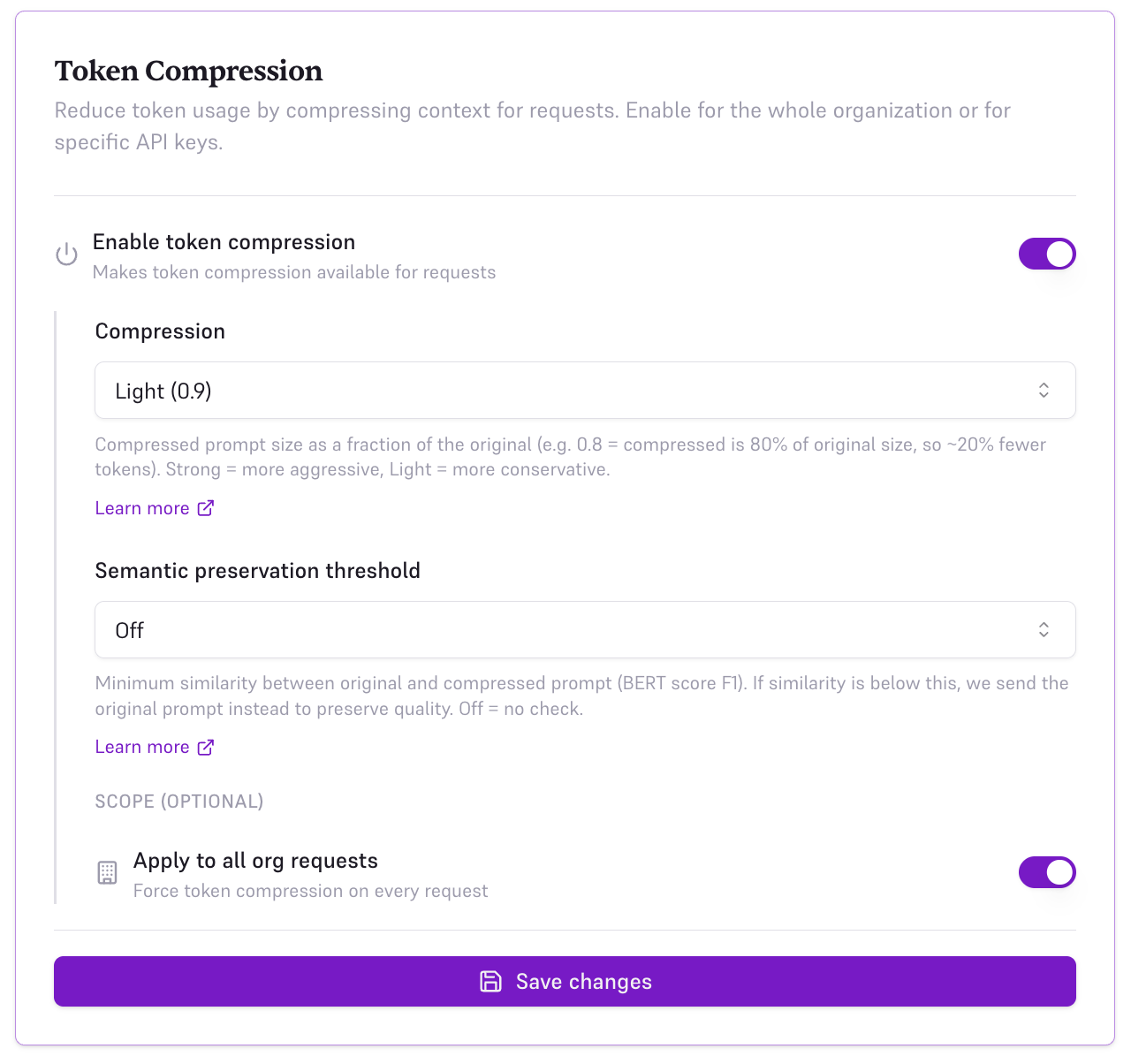
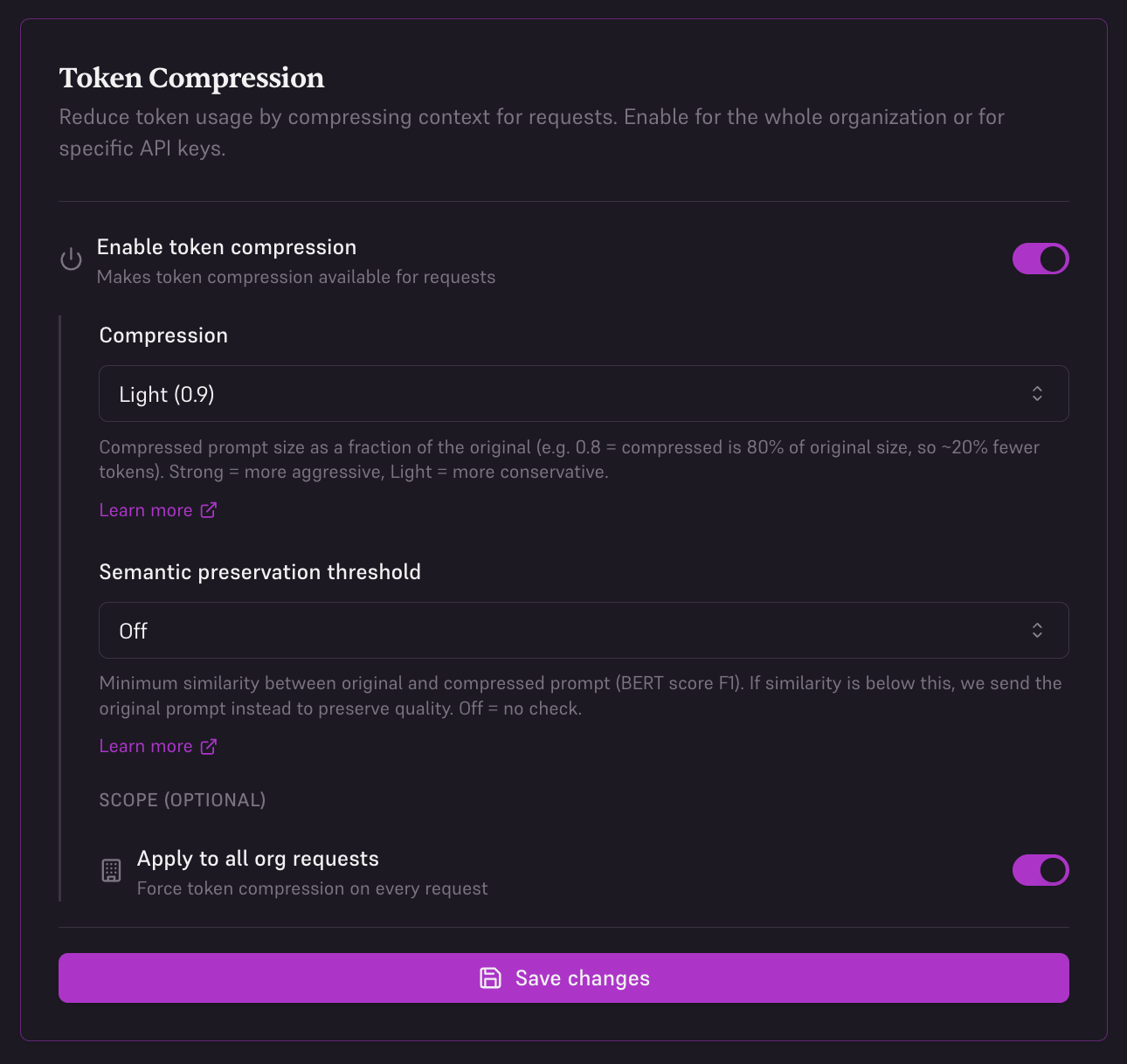
- Toggle Enable token compression on
- Set Compression to Light (0.9), Medium (0.8), or Strong (0.7)
- Set Semantic preservation threshold to Off, Ultra Safe (0.95), Safe (0.85), or Edgy (0.75)
- Under Scope, select Apply to all org requests
- All API keys will now use compression by default
SDK-level configuration takes precedence over console settings. If you enable compression in your code with
enable_compression: true, it will override the console configuration for that specific request.When It Works Best
Token compression delivers the highest savings for these common use cases:RAG Pipelines
40-50% reductionLarge document contexts with redundant information compress effectively. Ideal for Q&A systems, knowledge bases, and semantic search.
Long Contexts
30-45% reductionLengthy conversation histories, documentation, or background information. Common in chatbots and assistant applications.
Document Analysis
35-50% reductionSummarization, extraction, and analysis of long documents. Verbose source material compresses well.
Multi-Turn Agents
25-40% reductionConversational agents with growing context windows. Savings increase with conversation length.
Code Example
Every response includes compression metrics so you can track your savings:Real-World Savings
Here’s what token compression means for your monthly AI bill:| Use Case | Monthly Requests | Without Edgee | With Edgee (50% compression) | Monthly Savings |
|---|---|---|---|---|
| RAG Q&A (GPT-4o) | 100,000 @ 2,000 tokens | $3,000 | $1,500 | $1,500 |
| Document Analysis (Claude 3.5) | 50,000 @ 4,000 tokens | $1,800 | $900 | $900 |
| Chatbot (GPT-4o-mini) | 500,000 @ 500 tokens | $375 | $188 | $187 |
| Multi-turn Agent (GPT-4o) | 200,000 @ 1,000 tokens | $3,000 | $1,500 | $1,500 |
Savings calculations use list pricing for GPT-4o (3/1M input tokens), and GPT-4o-mini ($0.15/1M input tokens). Actual compression ratios vary by use case.
Best Practices
Optimize prompts for compression
Optimize prompts for compression
- Structure RAG contexts with clear sections
- Use consistent formatting in document chunks
- Avoid excessive whitespace in system prompts
- Group similar information together
Track savings over time
Track savings over time
- Monitor
compression.saved_tokensandcompression.cost_savingsacross requests - Use
compression.reductionto gauge effectiveness per request - Calculate cumulative savings weekly or monthly
- Use observability tools to identify high-compression opportunities
- Compare costs across different use cases
Configure compression per use case
Configure compression per use case
- Enable compression by default for all requests
- Compression happens automatically without configuration
- Track
compression.reductionto understand effectiveness (e.g.48= 48% fewer tokens) - Monitor
compression.time_msto ensure compression latency fits your SLA - Use response metrics to optimize prompt design
Combine with cost-aware routing
Combine with cost-aware routing
- Use automatic model selection for additional savings
- Route to cheaper models when appropriate
- Compression + routing can reduce costs by 60-70% total
- Monitor both compression and routing savings
Response Fields
Every Edgee response includes detailed compression metrics:- Track savings in real-time
- Build cost dashboards and budgeting tools
- Identify high-value compression opportunities
- Optimize prompt design for maximum compression
What’s Next
Observability
Monitor token savings, costs, and compression ratios across all requests.
Intelligent Routing
Combine compression with cost-aware model routing for even greater savings.
Quick Start
Get started in 5 minutes and start saving on your next request.
SDK Documentation
Explore SDKs in TypeScript, Python, Go, and Rust with built-in compression support.